Current as of 5 October 2026. Microsoft licensing, prices and export options change often; we update this post when they do.
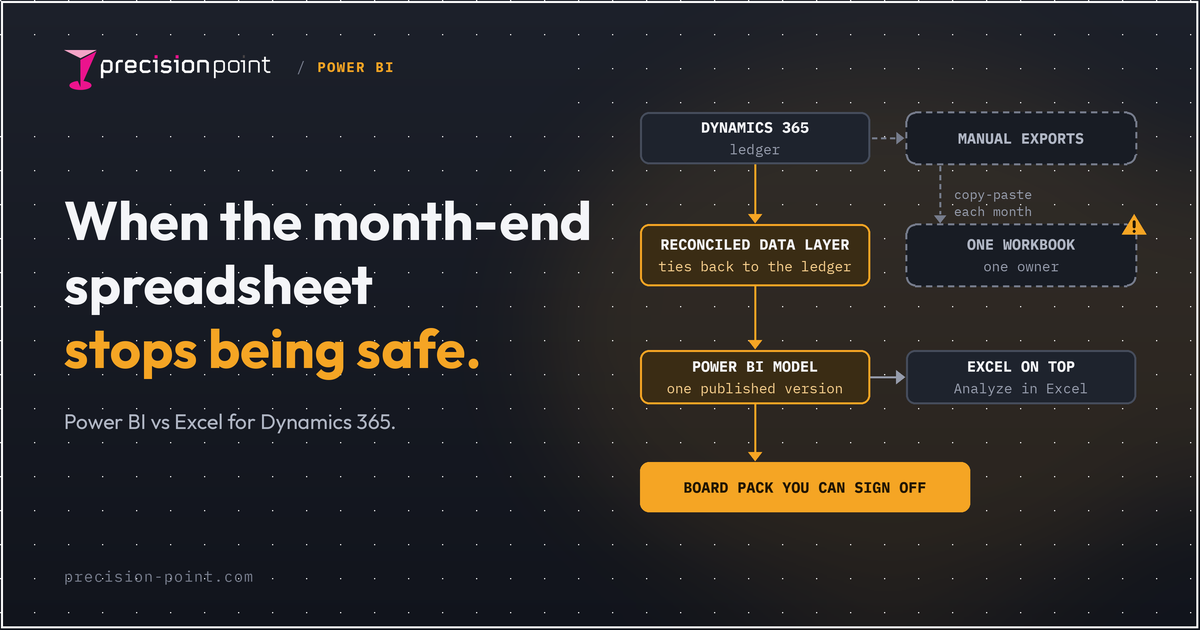
Excel is fine for month-end on Dynamics 365 while one person owns a small, stable close and every figure ties back to the ledger. It stops being safe when the close depends on manual exports, a single workbook owner and numbers nobody else can check. Power BI helps only once the data underneath is reconciled to D365.
Is Excel still fine for month-end on Dynamics 365?
Often, yes. With few entities, a stable chart of accounts and a board pack that has not changed shape in years, a well-built workbook does the job. Excel is quick and finance knows it.
The problem is rarely the tool. A month-end that started as one tidy workbook becomes a chain of exports, lookups and pasted values that only one person can run and nobody else can check. At that point you no longer have a reporting process. You have a dependency.
What are the signs the month-end spreadsheet has stopped being safe?
A BlackLine survey of 1,339 finance staff and executives, published in January 2024 and covering the UK, found nearly 40% of CFOs do not fully trust their financial data. In the same survey, 68% said manual processes leave them open to errors, and 27% said clunky spreadsheets create information gaps until the month-end close. It is a vendor survey, so read it as a signal, not a benchmark.
Manual exports and copy-paste
Every month someone exports trial balances, ledger lines or entity data from D365, pastes them into tabs and refreshes the lookups. Each step is a chance to pick up the wrong period or miss a company. The JPMorgan task force report into the London Whale losses described a risk model run in Excel with manual copy-and-paste, where one formula divided by a sum instead of an average (summarised here).
One person who understands the workbook
If the close slips when one analyst is on holiday, you have key-person risk, and an audit question waiting to happen. Academic reviews of spreadsheet errors point the same way. Field audits summarised by Powell, Baker and Lawson found errors in 94% of the spreadsheets examined, with an average cell error rate of 5.2%. The same authors are clear that the evidence is too thin for a reliable error rate, so treat it as a warning rather than a statistic.
Numbers that don't tie back to D365
The clearest sign is a board pack figure nobody can trace to a ledger balance without rebuilding the logic by hand. If "where does this come from?" takes a day to answer, the close is not under control. Drill-down from report to transaction is not a nice-to-have at month-end. It is how you sign off with confidence.
Power BI vs Excel for month-end: how do they compare?
Both tools can produce a profit and loss. The differences are about control: who can check the numbers, and how much depends on one person.
| Factor | Excel workbook | Power BI on a reconciled D365 model |
|---|---|---|
| Source of truth | Whatever was exported and pasted this month | A shared semantic model built from D365 data |
| Refresh | Manual export, paste and recalculate | Scheduled refresh, or near real-time options for F&O |
| Audit trail | Depends on the author's notes and tab names | Defined measures and a traceable data lineage |
| Version control | Files named "final", "final v2", "final FD" | One published model; reports read from it |
| Access security | File permissions, or none | Row-level security for report viewers |
| Key-person risk | High if one person owns the workbook | Lower, because the logic lives in the model |
| Drill to transaction | Only if someone builds it by hand | Built in when the model goes down to ledger lines |
| Effort to set up | Low at first, rising every month | Higher upfront, depending on data quality and scope |
Two caveats. Row-level security in Power BI restricts Viewers only, not workspace Admins, Members or Contributors, so workspace roles still need care. And the right-hand column assumes the model underneath is right. That is the next section.
What has to be true before Power BI helps?
Power BI on unreconciled data just makes wrong numbers look better. A polished dashboard that does not tie back to the ledger is more dangerous than an ugly spreadsheet, because people trust it faster.
So the order matters: first a data layer where every balance agrees with the D365 ledger and any difference is visible, then Power BI financial reporting on top.
Microsoft gives you starting points on both platforms. For Finance and Operations, the Entity store supports Power BI DirectQuery, so reports show the latest data without a manual refresh. F&O tables can also be linked to Microsoft Fabric without extra infrastructure, using Dataverse storage and a Fabric workspace.
Timing matters too. Microsoft's transition FAQ confirms Export to Data Lake stops permanently on 30 November 2026, with no extensions. BYOD has no retirement date, but Microsoft recommends Synapse Link or Fabric Link. If your reporting feed depends on it, this decision already has a deadline.
For Business Central, the Finance Power BI app covers the income statement, balance sheet, budget comparison, liquidity KPIs, EBITDA and aged receivables and payables. It needs your G/L account categories mapped first, which is a finance task, not an IT one.
Standard content does not reconcile multi-entity data, eliminations or your own reporting structure. That is the gap our Power BI for Dynamics 365 service is built to close.
What actually changes in the month-end close?
Journals, accruals and reviews still happen in D365. What changes is the reporting step after the ledger closes.
- No rebuild each month. The board pack reads from the model, so nobody exports and pastes to produce it.
- One version. Finance, the board and budget holders see the same figures from the same model.
- Faster answers to "where does this come from?" Drill from the board pack line to the ledger rather than reopening a workbook.
- Clearer ownership. The logic sits in a model you can review and certify, rather than in one person's head.
Month end close automation of this kind is about control first and speed second. For the broader automation picture on F&O, see how to automate reporting in Dynamics 365 Finance and Operations. If you already have standard reports, read already have reports? why you still need BI.
What does it cost, and how much effort is it?
Licensing is the easy part. At the time of writing (5 October 2026), Microsoft UK list prices are GBP 10.80 per user per month for Power BI Pro and GBP 18.50 for Premium Per User, excluding VAT and paid annually. On Fabric capacity of F64 or above, viewers do not need a paid licence.
Effort depends on three things rather than on the tool:
- How clean and consistent your D365 data is, including the chart of accounts and dimensions.
- How many entities, currencies and eliminations the close covers.
- Whether you build the reconciled data layer yourself or start from something pre-built.
A single Business Central company is a short piece of work; a multi-entity F&O estate with years of workbook logic is a project. This is where Reveal, our pre-built and self-reconciling data warehouse foundation for D365, shortens the path, because the reconciliation is part of the foundation rather than a phase you build.
Do you have to give up Excel?
No. Finance will always want to pivot and test. What changes is where Excel gets its numbers from.
With Analyze in Excel, finance builds PivotTables on a live, refreshable connection to the Power BI semantic model. Row-level and object-level security still apply, and users need a Pro or Premium Per User licence, or a Free licence on F64 or larger capacity. When the model is certified, the endorsement badge shows in Excel, so people know they are working from the approved version.
That is the practical answer to Power BI vs Excel: Excel stays as the analysis tool, and the model behind it becomes the thing you sign off. For statutory and management statements in F&O, Microsoft's own Dynamics 365 financial reporting tool still has its place alongside both.
FAQ
Can Power BI replace Excel for finance?
For month-end reporting and the board pack, largely yes, once the data is reconciled to D365. For ad hoc analysis, no. Most finance teams keep Excel connected to the Power BI model through Analyze in Excel, so they analyse governed numbers rather than exported copies.
Does Business Central work with Power BI out of the box?
Partly. Microsoft's Finance Power BI app for Business Central covers the income statement, balance sheet, budget comparison, liquidity KPIs, EBITDA and aged receivables and payables. You need to map G/L account categories first, and multi-company or custom reporting needs more work.
Do we need a data warehouse first?
You need a data layer that reconciles to D365 before Power BI is safe for month-end. For a simple single-company setup, standard content may be enough. For multiple entities, eliminations or custom structures, a reconciled data warehouse is usually the practical way to get there.
How long does it take to move month-end reporting off Excel?
It depends on data quality, the number of entities and how much logic lives in the current workbooks. A single Business Central company is a short piece of work. A multi-entity Finance and Operations estate is a project. Starting from a pre-built, reconciled foundation shortens it.
Can finance still use Excel on top of Power BI?
Yes. Analyze in Excel gives finance a live, refreshable connection to the Power BI semantic model for PivotTables, with security rules still applied. Users need a Pro or Premium Per User licence, or a Free licence on F64 or larger capacity.
Talk to us
If your month-end depends on a workbook nobody else can check, start with the data layer, not the dashboard. See how our Power BI for Dynamics 365 service builds reporting that ties back to the ledger, or talk to us about your close.