Current as of 29 October 2026: Microsoft dates and licensing change, so check the Microsoft references below before you act. This update reflects Microsoft closing the Synapse Link Parquet option to new customers on 15 October 2026.
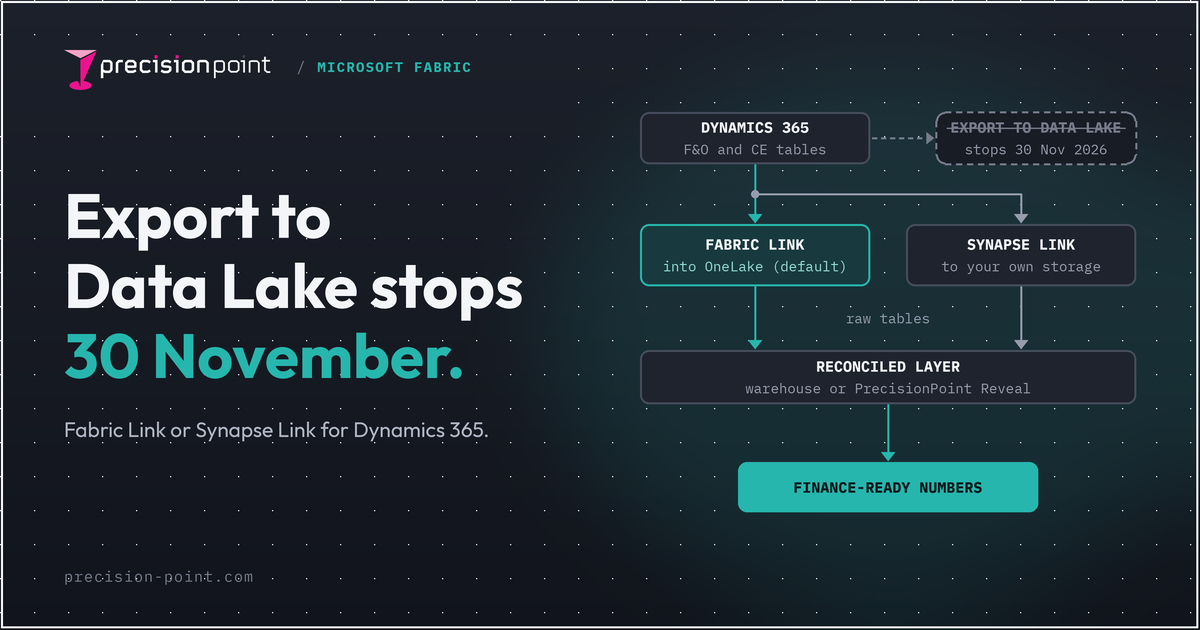
The short answer: Microsoft will permanently stop Export to Data Lake on 30 November 2026, and it will not grant extensions. After that date, it no longer exports new and changed D365 data. If you already run Microsoft Fabric, or you want your data in Delta Parquet, Link to Microsoft Fabric is the sensible default. If you need your D365 data in your own storage or feeding non-Microsoft tools, choose Azure Synapse Link, but note that new links now export CSV only. Whichever link you pick, it lands raw data, not reconciled numbers.
Why this choice now has a date on it
Microsoft retired Export to Data Lake for Finance and Operations on 1 November 2024. Its transition FAQ, updated on 14 October 2026, sets the hard stop: the service stops permanently on 30 November 2026, and Microsoft won't grant extensions after that. From then on, no new or changed data comes through it. If your reporting still reads from that lake, it stops updating. Microsoft's guidance is that if you depend on Export to Data Lake for near-real-time updates, you should move to Link to Microsoft Fabric with low-latency sync by 30 November. If you don't use Power BI or Fabric, it points to Synapse Link's incremental exports instead. BYOD for F&O carries on for now, with no announced retirement date, but Microsoft recommends moving to Synapse Link or Fabric Link.
So the question is no longer whether to move, or when. It is which of the two supported paths fits how your organisation actually works, chosen early enough to run old and new side by side and confirm the numbers match. We cover the wider transition in the end of Export to Data Lake and the practical steps in migrating off Export to Data Lake. Microsoft's own transition FAQ is worth reading alongside this.
Two definitions, kept short
Link to Microsoft Fabric is a no-copy, no-ETL link. It surfaces your Dataverse tables, and F&O tables when linked, into OneLake as Delta Parquet through shortcuts. The data stays managed in Dataverse; nothing is exported to storage you own. It needs Power BI Premium or Fabric capacity in the same region, and that capacity is not included with Dataverse. It also consumes additional Dataverse storage. See the Microsoft documentation.
Azure Synapse Link for Dataverse continuously exports your data, including F&O data, to your own ADLS Gen2 storage. You own the storage, the compute and the pipelines. It sends incremental change data and works with non-Microsoft tools. Since 15 October 2026, new links export CSV only: the Delta Lake (Parquet) option is closed to new customers, and Microsoft points anyone who wants Delta Parquet to Link to Microsoft Fabric. Microsoft is also retiring the Synapse Link name; in Power Apps the option now appears as Link to Data lake, and existing links keep running.
Fabric Link vs Synapse Link at a glance
| Link to Microsoft Fabric | Azure Synapse Link for Dataverse | |
|---|---|---|
| What it is | No-copy, no-ETL link surfacing data into OneLake as Delta Parquet via shortcuts | Continuous export of incremental change data to storage you own |
| Data scope | All non-system Dataverse tables, plus F&O tables when linked. Business Central does not flow this way. | Dataverse data, with the F&O data option generally available |
| Output format | Delta Parquet | CSV for new links. The Delta Lake (Parquet) option closed to new customers on 15 October 2026 |
| Latency | Low-latency sync rolls out automatically by region, with no opt-in, for F&O 10.0.47 and later. Microsoft quotes throughput of 1M+ records per hour per table, and refreshes can take up to 60 minutes at peak load | Incremental change-data (CDC) export; both paths work on delta data, not repeated full dumps |
| Cost and licensing | Requires Power BI Premium or Fabric capacity in the same region, not included with Dataverse. Also consumes additional Dataverse storage. New Fabric capacities have overage switched on by default, billed at three times the pay-as-you-go rate, and the overage threshold is not a hard spending cap | You pay for your own Azure storage and compute. From 15 October 2026, new customers get CSV output only; existing Parquet users must move off it by December 2027 |
| Storage | Data stays managed in Dataverse; no export to your own storage | Your own ADLS Gen2; you own it |
| Maturity | Microsoft's recommended path, actively invested in | Supported for CSV output. The Delta Lake (Parquet) option is deprecated and closed to new customers |
| Best fit | You already run Fabric, or want Delta Parquet with the lowest operational overhead | You need data in your own storage or feeding non-Microsoft tools, and CSV suits you |
One known limit worth flagging on Fabric Link: environments with more than 2,000 tables with change tracking enabled can't enable Fabric Link. Check this before you assume it will simply switch on. See Microsoft's Fabric Link troubleshooting guide.
Which should you choose
Three questions settle it for most finance and IT teams:
- Already on Fabric, or want Delta Parquet? Link to Microsoft Fabric is the default. It is the newest engineering, it copies nothing, and it carries the lowest ops overhead, provided you run the Fabric or Power BI Premium capacity it needs. Check the capacity overage setting when you create it.
- Need your own storage or non-Microsoft tools? Synapse Link is the path, now with CSV output for new links. You take on storage, compute and pipelines, and in return you keep full control of the data and where it goes.
- Still on Export to Data Lake? Move. Microsoft stops it permanently on 30 November 2026 and won't grant extensions, so staying put is the only genuinely wrong answer here.
When you set either one up, the screen in Power Apps is now called Link data. Fabric Link shows there as the recommended path, and the Synapse option sits under Other Links as Link to Data lake.
If you already use Fabric Link, two changes need planning. Existing profiles stay on the previous sync engine until you unlink and relink them, which triggers a full resync of every table, so schedule it off-peak. Low-latency sync also writes timestamps as INT64 rather than INT96, so check any queries, pipelines or semantic models that read those columns.
A note for Business Central teams: BC data does not flow through the Dataverse Fabric Link. BC2Fab, a partner workload from Navida using Fabric Open Mirroring, is generally available. Microsoft announced its own Business Central mirroring to Fabric in September 2026; its roadmap lists a preview in November 2026 and general availability in April 2027. For the wider comparison, see Data Lake vs Synapse Link.
The honest part: neither link gives you finance-ready numbers
Here is the point most vendor pages skip. Both links land raw, transformed tables. They are a landing zone, not a finance-grade model. That distinction is the difference between data that arrives and numbers your CFO will sign off.
Microsoft documents exactly how Synapse Link reshapes F&O data. SQL reserved words are renamed, so Level becomes Level_ and Resource becomes Resource_. F&O ID fields become FnO_Id. Deleted rows are retained and flagged with isDelete rather than removed. Long text in nVarChar(max) fields is truncated at 2,000 characters. Fabric Link likewise lands raw, transformed tables without business logic. None of this is a fault in either link; it is simply what a landing zone looks like. What you do not get is guaranteed business logic, reconciliation, or a model finance can trust without further work.
That is why a downstream warehouse still earns its place. It is where the numbers get modelled, reconciled and validated, turning arriving data into figures the business can defend in a board meeting. You can build that from scratch, or you can shorten the last mile. Reveal, our pre-built self-reconciling data foundation, takes either link and turns it into trusted, report-ready data without a bespoke build from the ground up. The link handles delivery. Reveal handles trust.
FAQ
Is Export to Data Lake still supported in 2026?
No. Microsoft retired Export to Data Lake on 1 November 2024 and will permanently stop it on 30 November 2026. After that date it no longer exports new and changed data, and Microsoft won't grant extensions. Move to Link to Microsoft Fabric or Azure Synapse Link before then. BYOD has no announced retirement date, but Microsoft recommends the same move.
Does Link to Microsoft Fabric need a separate Fabric capacity licence?
It needs Power BI Premium or Fabric capacity in the same region, and that capacity is not included with Dataverse. Fabric Link also consumes additional Dataverse storage. On new Fabric capacities, overage is switched on by default and billed at three times the pay-as-you-go rate, and the threshold you set is not a hard cap, so review it when you create the capacity.
Is Synapse Link being deprecated in favour of Fabric Link?
Partly. The Delta Lake (Parquet) export option in Synapse Link is deprecated: it closed to new customers on 15 October 2026, and existing users must move to CSV output or to Link to Microsoft Fabric by December 2027. Microsoft points anyone who wants Delta Parquet to Fabric Link. Synapse Link itself continues for CSV exports to your own storage, and in Power Apps it now appears as Link to Data lake under Other Links, as Microsoft retires the Synapse Link name.
What data latency does Fabric Link give for F&O?
Low-latency sync rolls out automatically by region, with no separate opt-in, for F&O 10.0.47 and later at the minimum builds Microsoft lists. Microsoft quotes throughput of 1M+ records per hour per table, and says refreshes can take up to 60 minutes at peak load. Existing Fabric Link profiles must be unlinked and relinked to use it, which triggers a full resync and changes timestamps from INT96 to INT64, so plan that window.
Do Fabric Link or Synapse Link give finance-ready reconciled numbers?
No. Synapse Link with F&O data lands raw, transformed tables with renamed fields, truncated long text and isDelete flags. Fabric Link likewise lands raw tables without business logic. That is a landing zone. Reconciled, finance-grade numbers come from a downstream warehouse or a pre-built foundation such as Reveal.
Talk to us
If you are weighing up Fabric Link and Synapse Link, or you have already picked one and now need the numbers finance will actually trust, we can help you get from a working link to reported, reconciled data. See how Reveal shortens the last mile, or talk to our team about your D365 environment.